 Checkcraft
How to write an API bug report a developer can reproduce
Get help with your first test →
The tester sees a failure but the developer cannot reproduce it. Capture the same conditions, an explicit expectation and the actual data. Build an actionable report from a small example.
Start with a testable discrepancy
An API does not work is too vague to reproduce. For this exercise, use status contains ERROR instead of the expected OK and identify the requirement behind that expectation. The linked Checkcraft case includes two JSON samples. This is a response-checking exercise, not evidence of a production incident.
Save the request and reproduction conditions
For your own defect, record the method, test environment URL, parameters, request body and service version. Include required setup and the test user role. Share a sanitized copy when using cURL or a Postman collection. The recipient should supply their own authorized credentials.
Show expected and actual response values
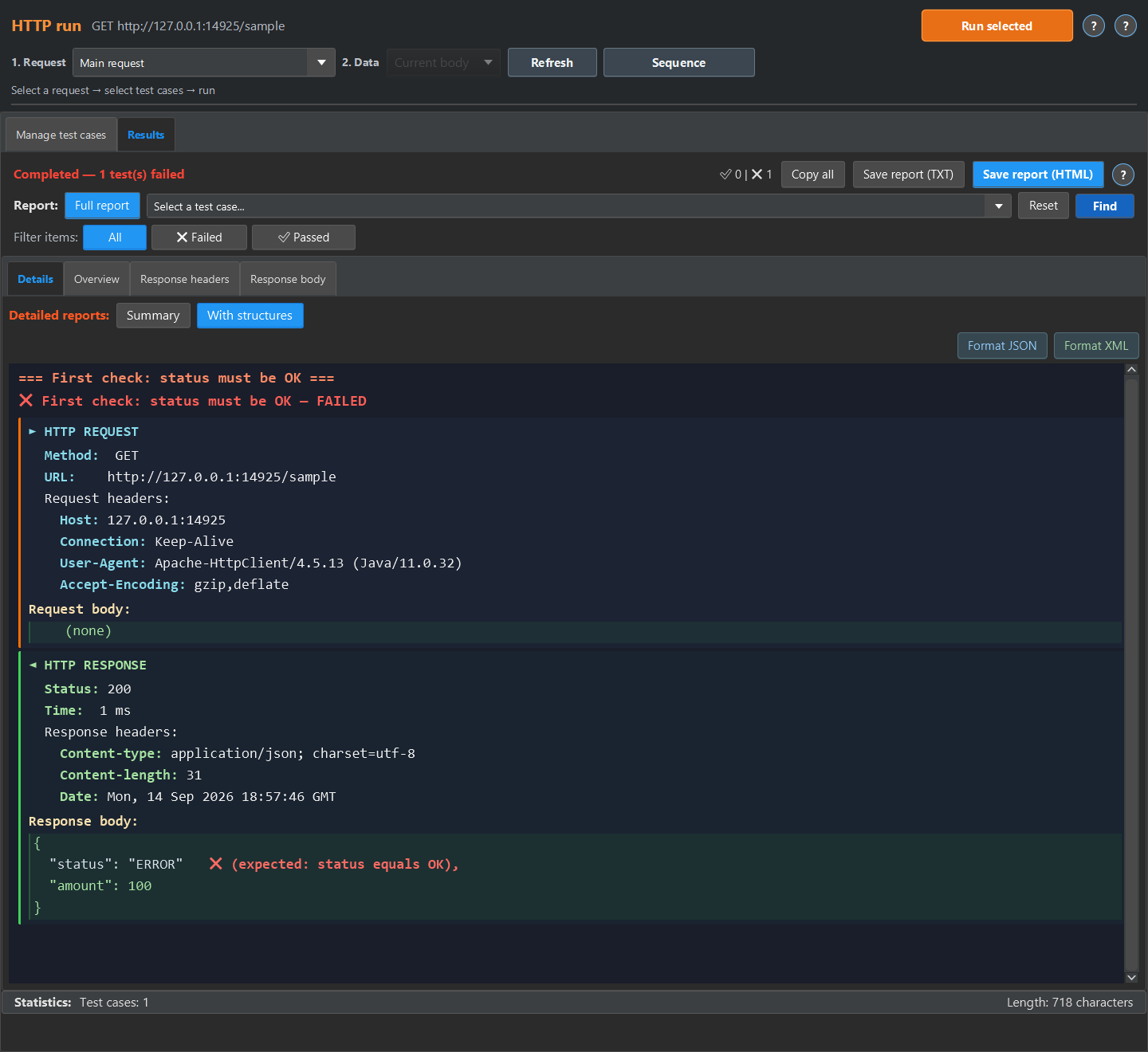
The sample assertion expects status to be the string OK. ERROR violates the assertion even though the JSON is valid. Include both values and the field path. If your real request returned HTTP 200, record that separately from the response body. Do not invent a status code, duration or trace ID.
{"status":"ERROR","amount":100}Reproduce the sample failure in Checkcraft
Import the linked first-check.testcase.json in the test-case editor. Open it, paste the passing JSON for analysis and run the case. Repeat with the failing JSON without changing the assertion. OK should pass and ERROR should fail. This pair checks the assertion itself before you use a real API.
Attach the report and reproducible data
After an HTTP run in Checkcraft, open the results and save HTML or TXT. The detailed report places assertions beside the data. For another tester, include the exported test case and a sanitized response. A test-case file does not replace the request, environment or credentials. If logs or a database are involved, explain how they relate to the operation and how the recipient can verify them.
Share the request without tokens or passwords
Review Authorization, Cookie, API keys in URLs, environment variables, response bodies and the attached report. Replace secrets with clear placeholders. Use the same replacement order ID throughout the request, response and description. Masking a UI field does not prove that an export omits its value. Open and inspect the prepared attachments before sharing them.
Copy an API bug report template
Replace placeholders with your observations and mark unknown information explicitly. For an HTTP workflow, describe the actual request. For a pasted-JSON exercise, say that data was pasted into the editor so the recipient does not look for a nonexistent server.
Title
[Field and observed discrepancy]

Environment and version
[Test environment, service version, user role]

Preconditions
[Test data and requirement]

Request or sample file
[Method and URL, sanitized cURL or JSON filename]

Reproduction
[Actions in execution order]

Expected result
[Field path, type, value and requirement]

Actual result
[Response, mismatched field, observed HTTP status]

Operation correlation
[Time with time zone, requestId or traceId if available]

Attachments
[Sanitized data, test case and report]

Retest after the fix
[Version and result using the same steps]
Retest after the fix
Repeat the original request and assertions under comparable conditions and keep the new result alongside the old one. Postman and code-based tests can also support reproducible defect reports; AI can help draft the description. The actual response still needs verification against the requirement. Use the linked samples to check whether the report contains enough information to repeat the failure.
Repeat the sample
The quick experiment below runs in the test case editor. The screenshots show the detailed report available in HTTP run or Log run. For HTTP run, return the sample JSON or XML from a local mock and run the imported case against it, then open Results, Details and With structures. For Log run, load the sample into a log source, enable No request, run the case, then open Details and Detailed.
These are existing synthetic fixtures and captured text reports, not a customer deployment.
Start with the linked example and compare its result with your own test requirement.