 Checkcraft
Create conditional and negative API tests
Checkcraft is a desktop app for checking APIs and logs without code, with a free edition. Download, no sign-up →
An error scenario often has a different response shape from a successful request. Conditional checks let the test choose the applicable rules, but an unmatched branch still needs a clear outcome.
The example checks an error code when status is ERROR and demonstrates a failure when that code is wrong.
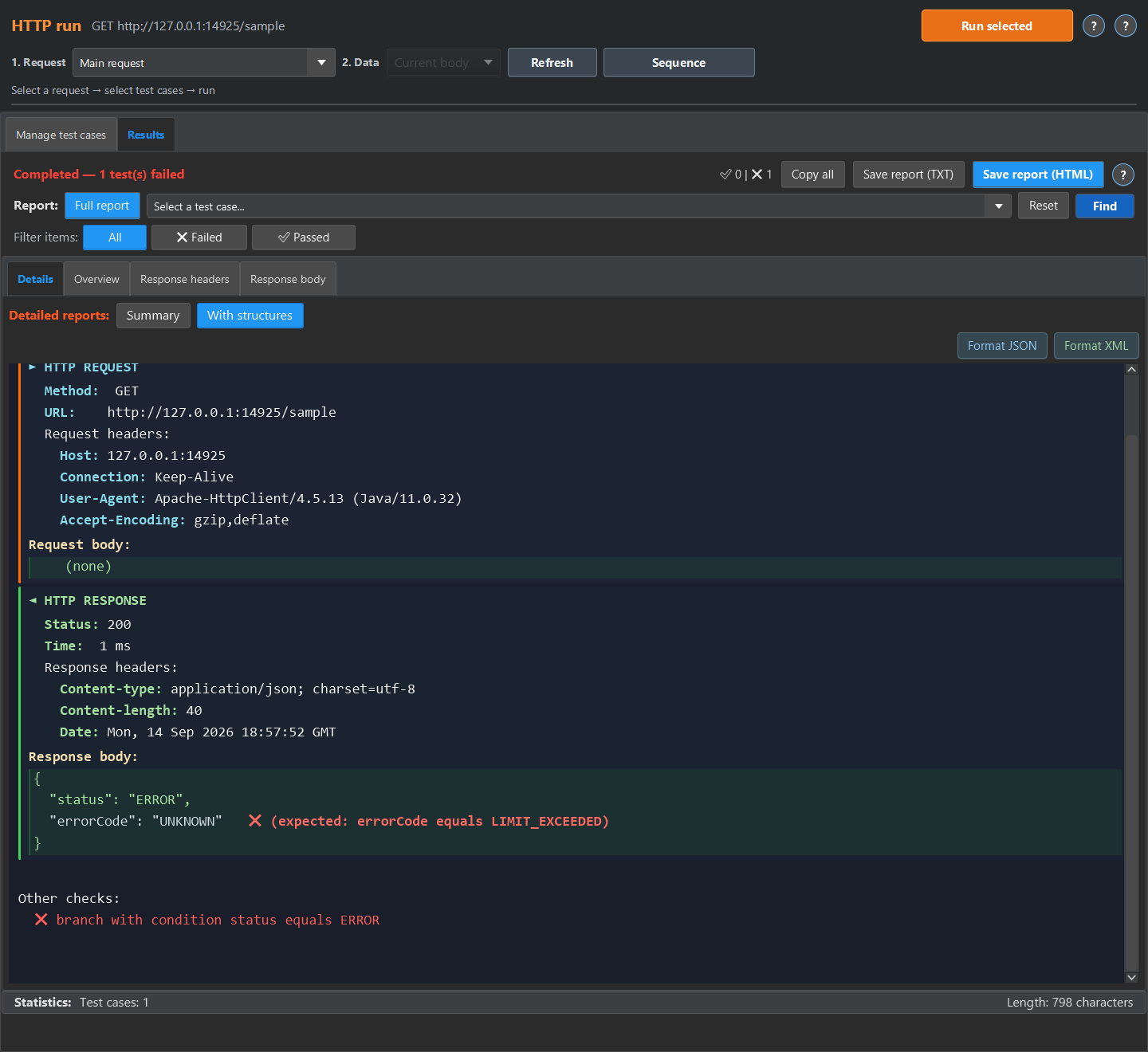
State the negative scenario
Choose an invalid value, missing field or other documented trigger. Check both the HTTP status and the required business error fields. A test for a rejected request can pass when the service rejects it correctly.
Choose the right condition mechanism
An IF step applies to the steps below it: if its condition is false, those steps are skipped. Step run conditions can express alternative branches. Do not confuse a skipped branch with evidence that the expected branch ran.
Make missing coverage visible
When the contract requires one of several outcomes, configure unmatched alternatives as an error where supported, or add an explicit result check. Run a matching example, a wrong-value example and an example that matches no expected branch. Review the report for skipped as well as failed steps.
Repeat the check with ready-made files
The quick experiment below runs in the test case editor. The screenshots show the detailed report available in HTTP run or Log run. For HTTP run, return the sample JSON or XML from a local mock and run the imported case against it, then open Results, Details and With structures. For Log run, load the sample into a log source, enable No request, run the case, then open Details and Detailed.
Download the Checkcraft test case and two inputs. One input is valid, and the other contains a deliberate error. These synthetic examples are available without registration.
Run the example in Checkcraft
Create a collection, a check and a test case using the workspace tree context menu. Click Import in the test case editor and choose the downloaded test case. Open the added case, copy the valid JSON, click Paste data for analysis, then Run test case. Open Result to inspect the report.
Repeat with the broken JSON without changing the rules. The first run should pass and the second should fail. If you see a different outcome, check the selected data source, imported steps and report.
The example files were executed against the application source on 14 September 2026. Reference reports in English are available for the passing run and failing run. Sample names and literal data values do not change when you switch the interface language.
See the result on a small example first
Start with the sample, inspect the failure and then try a sanitized example from your own API. Free is available for Windows and Linux with no time limit.
Download FreeDownload and first runNo sign-up or email needed, the archive is ready in a couple of minutes. See the edition limits.