 Checkcraft
Run API tests in Jenkins and CI pipelines
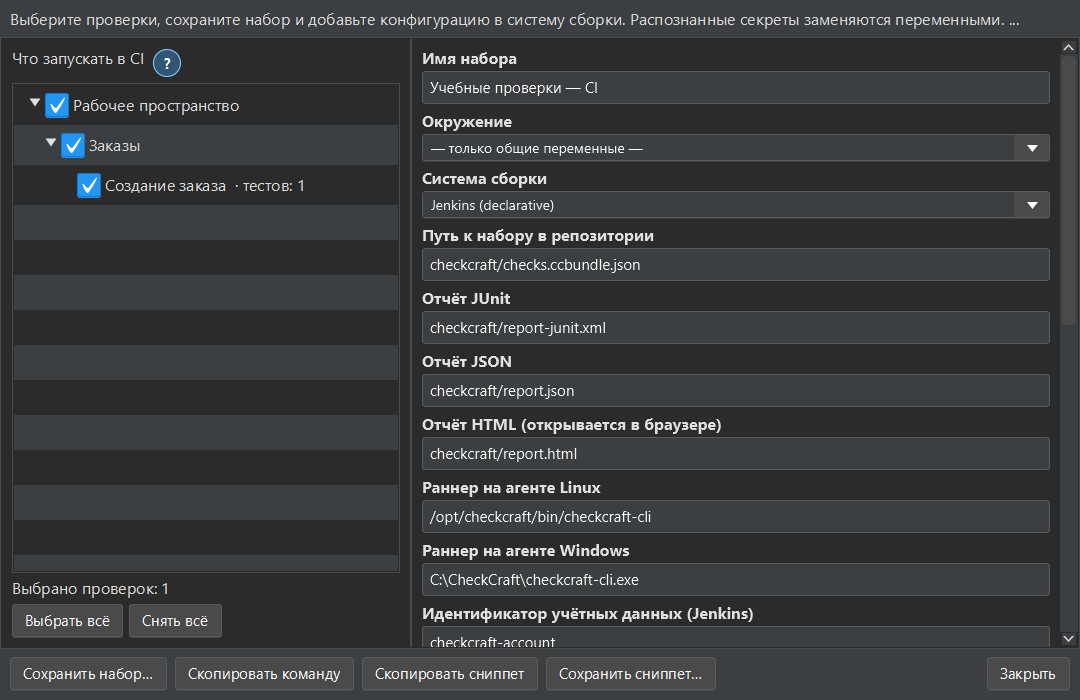
A saved test becomes more useful when a build can run it consistently. The CI panel produces a suite and configuration for a selected pipeline system.
You will prepare a suite and identify its runtime, secrets and report settings before enabling unattended execution.
Prepare and inspect the suite
Open the CI/CD panel, select checks that contain request sequences and save the suite. Choose the pipeline format and inspect the generated command. Use the command from your installed version instead of copying flags from an unrelated release.
Set up the build agent
Install the supported Checkcraft runtime on the agent and provide the suite path. Set the required authentication and environment variables using the CI secret store. The generated panel lists missing values. Do not commit tokens or passwords to the repository.
Preserve the failure signal
Run a known passing case and a deliberately failing case before relying on the pipeline. Publish the generated report and make sure the job reacts to a test failure. Unattended execution is edition-dependent; check the pricing page and your account rather than assuming it is included in Free (beta).
See the result on a small example first
Start with the sample, inspect the failure and then try a sanitized example from your own API. Free (beta) is available for Windows and Linux with no time limit.
Get Free (beta)Download and first runAn account and verified email are required to obtain the build. See the edition limits.